Monday, September 14, 2009
Dailies at Pixar


What is your favorite part...
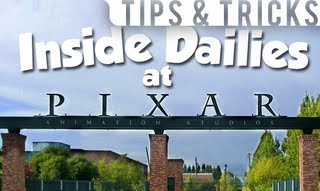
...of the animation process? Find out my answer to this in my latest post on the Animation Tips & Tricks Blog. I'll give you a hint: it's not waiting for my shot to load. Feel free to mention your favorite part in the comments on the T&T site!
Wednesday, September 09, 2009
Rhythm and Texture
These are a couple of animation terms that get tossed around a lot, and many animators are not completely clear on exactly what they mean (I wasn't completely sure about them myself until well into my animation career). One reason I think they're so hard to pin down is that there's a lot of overlap (not that kind of overlap) between them, and it's hard to talk about one without referencing the other. Kind of like trying to talk about spacing without talking about timing and arcs. But lest I digress, I'm going to talk a bit about rhythm and texture as specifically as I can, and how important they are in your animation. I suppose I should attempt to define these terms before I go much further, so here's how I understand them:
Rhythm - how the actions or "beats" in a shot are spaced out over the length of a scene. You might also call this "tempo". Unlike with music, good animation has an inconsistent rhythm, making it less predictable.
Texture - the variations of timing and poses in your shot. Big and little actions, slow and fast timing, flurries of action and holds. A shot in which all the actions are the same size, have the same timing, and occur in an even rhythm has no texture.
Take a look at this clip from the classic Disney double-feature, "The Adventures of Ichabod and Mr. Toad". Here we see the hero, Ichabod Crane, wooing Katrina and evading fellow suitor, Brom.
There is plenty to be appreciated in this clip, but let's pay attention to the rhythm first. Notice how the first 4 pose changes on Ichabod are all timed about the same and are all spaced evenly in time - you can count out loud between the beats: "1-1000, 2-1000, 3-1000, 4-1000". In animation we generally try to avoid this kind of evenness in the timing; in music, a consistent rhythm is a good thing, but not in animation.* There's a method here, though: the animator is establishing a pattern so that he can break it. He gets the audience used to a certain rhythm so that when he changes it the audience is surprised. When Brom appears suddenly and tries to grab Ichabod the scene shifts into high speed. This contrast of rhythm creates emphasis - we know something important just happened. It's such a fast change that if it weren't staged perfectly, the audience would miss it and wouldn't understand the action. Notice how Brom hits his "grab" pose and holds it, and how Ichabod's hat floats in the air to tell you where his head "was", since there was no anticipation into his drop.
My favorite part of this scene is the next shot, where we cut inside the house and Ichabod is standing completely still, as if nothing just happened. The action of lifting his hat is tiny compared to all the big flourishes and the escape that proceeded the shot, and is isolated to just his arm. It's another big change in the rhythm and phrasing of the scene, and it not only reiterates Ichabod's composure in front of women, but also adds unexpected entertainment value. A few more quick actions (grabbing and presenting the flowers), and the sequence ends with Ichabod melting into a relaxed pose. All these changes in tempo, size of action and timing give the scene its texture.
The above clip is a pretty broad example, but you can achieve the same kind of texture in a smaller, simpler scene. Here's a clip from Monsters, Inc. featuring Sully, who is reacting to an offscreen sound.
Essentially, Sully is doing the same action over and over: he is looking around for the source of the sound. However, the animator has given the shot texture by varying the timing and size of the looks, as well as breaking up their distribution over the course of the shot to give it a more organic, staccato rhythm. Notice also that there is a progression in the looks; they start small, just in the eyes, then move on to progressively bigger and bigger moves involving the head and the torso. There's even a double-take to break up the tempo even more. The final look is the largest, and involves the biggest shape change in the body by incorporating the screen left arm. This gives the final look the most emphasis, because it's the point of the shot; this is when Sully will actually see the source of the sound (Boo playing with his tail).
Planning and blocking and animated scene is a complicated undertaking, and there are many things to keep in mind. It's not enough to obey the 12 animation principles. It's not enough to have original acting ideas and clear posing. You have to figure out the best combination of all these things to create your performance. Memorizing the dictionary and grammar rules does not make you a poet! You must find ways to string your ideas together lyrically to create a clear, cohesive, and of course, entertaining performance. You may come up with 4 great ideas for your shot, but the ideas might not flow together well. As important as your acting ideas are the changes between your ideas. What's more, the shot may only need 2 ideas. Try to be economical with your ideas, and find a sequence that flows together well. Figure out how little you need to do in the shot.
I usually start by just throwing out every idea I can on paper and/or video tape. Next I narrow it down to my favorite ideas that I think are most appropriate to the shot. From these I try to find the ideas that flow together naturally and create a nice progression, making sure that the biggest change occurs at the right time to emphasize the point of the shot. Once I have this phrasing worked out, I start to block my poses and actions into the computer. Now I can start to experiment with timing, playing with the speed of the individual actions and moving my beats around in time to try to break up the rhythm of the shot. The computer is great at helping you figure out your timing without wasting a lot of effort. This is how I find the texture in my animation. Usually after I've done my first blocking pass, I'll end up adding or removing an idea, or changing something from what I had planned to make it work better in the actual 3D scene. But no matter what I always play back the entire scene to make sure it has a pleasing texture. Always check the texture not only across the single shot that you're working on, but across the entire sequence. Remember to look at your work in context!
* What if you're animating to music? If a character is singing or dancing you want to respect the overall rhythm of the music, of course, making sure you regularly accent the beats of the music. But you must also look for places where you can add accents that fall outside the music's tempo. If you stay slavishly locked to the same beat, the animation will quickly become boring to watch. Have some accents fall on down beats, some on upbeats, some between beats. Have some actions happen in double-time, some in half-time. Remember that whenever you stray from the tempo of the music, you create emphasis, so do it wisely! Check out this vintage Flat Eric clip:
Note how he hits the down beat for most of the clip, but occasionally he breaks into a new rhythm, or skips a beat for emphasis (around 00:23). These little changes in the rhythm keep the clip entertaining to watch.
Thanks for reading!
Tuesday, September 08, 2009
Spline editing post
Here's another post I did on the Animation Tips and Tricks blog, this time about spline editing. If you want some more in-depth info on splines, check out my tutorials here. You can see some of my previous T&T posts on the main page, as well as some tips from Shawn Kelly.
Sorry for the cross-post; I'm composing an original post on texture in animation right now, so stay tuned!
Monday, August 24, 2009
Animator Tips & Tricks
I know I haven't been posting much original content here of late, but maybe this will help: I'm this month's guest blogger on the Animation Tips & Tricks blog, brought to you by the good people at AnimationMentor.com. My first post is a response to the question, "What separates the good animator from the bad animator?" Be sure to read the comments too, as I added some additional thoughts there. Enjoy!
Monday, August 03, 2009
Wednesday, July 29, 2009
Toy Story Double Feature trailer
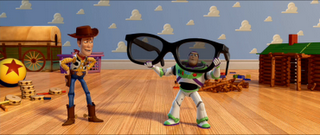 Check out this new trailer for Toy Story 1 and 2, which will be rereleased in theaters in 3D this Fall. Of course the trailer itself is better seen in a theater in 3D, but it's still pretty good on your computer.
Sunday, July 26, 2009
Comic Con!

I just got back from Comic Con in San Diego. It was great to see some old friends (and my Mom) and dive into the sea of geek. You really can't grasp the size of this event without seeing it first hand. To that end, I've posted a bunch of photos, including some from "Flynn's Arcade", a replica of the arcade in the original Tron, built in a warehouse in downtown SD as part of a promotional gimmick.

I also got into the Disney 3D panel, hosted by John Lasseter, where they showed clips from upcoming films. We saw the new 3D teaser for the Toy Story 1&2 double feature, the opening sequence of Toy Story 2 in 3D, a Toy Story 3 teaser (featuring Ken), some Beauty and the Beast in 3D, and two sequences from The Princess and the Frog. Then Hayoa Miyazaki showed up and premiered a clip from Ponyo. Lasseter and Miyazaki were given honorary Inkpot awards for there contributions to animation. Patton Oswalt was there to moderate the ensuing panel, which featured John Lasseter, Lee Unkrich, Kirk Wise, Ron Clements, John Musker, and Miyazaki.

There was an Avatar panel featuring James Cameron that I would have liked to attend, but I didn't want to have to wait in line for hours. I also missed the panel on Walt Stanchfield, which really bummed me out. Luckily, Animation Mentor recorded the event and will be sharing it online for free!
Wednesday, July 08, 2009
CG Overdrive, Singapore photos up on Flickr

Shortly after I returned from Singapore the cooling system on my Mac G5 leaked and fried the power source. I finally got it back on Sunday and I'm slowly catching up on everything, including posting photos from my travel. I haven't added a lot of useful descriptions yet, but hopefully you can still enjoy them. I gave a 5-hour (gasp) lecture on animation research, planning and blocking. It was a fun event, and best of all I got to hang out with lots of other talented artists, including Craig Mullins, Feng Zhu and Alex Alvarez. We had lots of great food and leveraged our jet lag to help us party to the wee hours. I also got to tour the Lucasfilm studios there, and I even met a few Animation Mentor students. I'm already looking forward to my return visit!
Wednesday, July 01, 2009
Nail Art
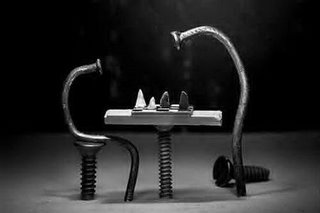
Here is an amazing compilation of photos of... Nails. Not only are these fun to look at, but they are great examples of how staging, lighting and line of action can tell a story visually. Note how the shapes of the nails can communicate emotion, intent, physical state, and even age. When two or more nails are present in the frame, you can deduce their relationship by the contrast and/or affinity of their poses, their relative sizes, and their spacial placement. Enjoy!
Tuesday, June 23, 2009
Mowgli animation by Milt Kahl
Milt Kahl (Mowgli) from Victor Ens on Vimeo.
I don't know if this has been posted around, but it's always inspirational to look at some well-drawn animation. And of course Milt Kahl is the king of well-drawn animation! Check out the weight, timing and solid draftsmanship in this clip! We are not worthy. While you're looking at that, I'll be busy trying to get together some photos from CG Overdrive to post. Stay tuned!
Sunday, June 14, 2009
I'll be at CG Overdrive in Singapore next week

If you're planning on being in Singapore next week, why not swing by the annual CG Overdrive Conference? I'll be giving a couple of animation lectures there, along with fellow Pixar Animator John Collins. Alex Woo from Pixar's story department will also be speaking there, as will be plenty of other industry professionals, and it should be a good time. I'm looking forward to some BBQ stingray, myself!
Friday, June 05, 2009
Partly Cloudy on iTunes

If you've seen UP, then you've (hopefully) also seen the charming short film that precedes it, Partly Cloudy. Of course it looks best on the big screen - and it's pretty neat in 3D, too - but you can purchase and download it from the iTunes store right now!
Friday, May 29, 2009
Stocks down? Go see UP!
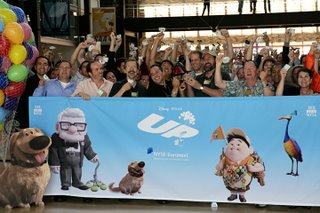
Pixar had the honor of ringing the bell to close the New York Stock Exchange today, while celebrating the opening of our latest feature, Up. You can see info and a clip of the event here (look for me near the back row - I'm one of the greenish pixels). You can't do any more trading, so why not go see the film? Right now. I'll wait.
Tuesday, May 19, 2009
Meet the Spy
Here's another brilliant cinematic sequence from the guys at Valve. It was about a year ago that I posted some other Team Fortress 2 Character Trailers, and I'm glad to see they're still making them! Great writing, design and animation, and a healthy dose of sex and violence.
And in case you missed this one (like I did) here's Meet the Sniper. Enjoy!
UPDATE: You can see all the character movies in high quality here.
Sunday, May 17, 2009
Some old stuff
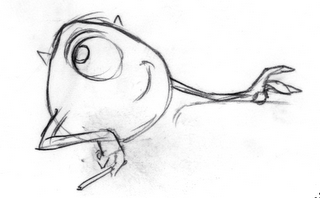
Enough of all this new stuff, let's jump in the Way-Back Machine! It's the summer of 1999, I've been hired as an animator at Pixar and I'm working on "Monsters, Inc." - the other Pete Docter film. I have no feature film animation experience (or much of any animation experience at all), I'm still getting the hang of Pixar's software and I'm worried that I'll get canned as soon as they find out I'm winging it! These are the memories that returned to me as I was thumbing through a stack of old planning drawings I did for Monsters. For posterity I've uploaded a few to my Animation Thumbs Gallery. It's nice to see that my drawing has gotten better, and I'm pretty confident that my animation has, too. They haven't fired my yet, so I must be doing something right!
Wednesday, May 13, 2009
Up at the Cannes Film Festival
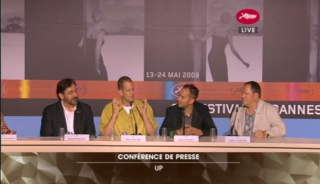
In case you weren't aware, "Up" had the honor of being the opening selection at this year's Festival de Cannes. It was screened in 3D with subtitles to rave reviews. Here's a video of an ensuing press conference with Director Pete Docter, Co-Director Bob Peterson, Producer Jonas Rivera and Executive Producer John Lasseter.
Monday, May 11, 2009
This One Time...
This one time... from nelson boles on Vimeo.
Here's a great animated short by CalArts student Nelson Boles. I really love the look of it and the whimsical style and storytelling.Let's Do Nothing!
Subscribe to:
Posts (Atom)