Wednesday, February 24, 2010
Gesture drawing with Mark McDonnell
I've found that practicing gesture drawing really helps me improve the design of poses in my animation, and is very useful for planning my scenes. That, and I still just love drawing! I stumbled across this tutorial video from Mark McDonnell about warming up for gesture drawing, and I think there's some really useful information in here for animators. I especially like how he takes the live model's poses and changes them to make them clearer, and how he talks about the importance of energy over draftsmanship. Mark has a whole YouTube channel here.


Thursday, February 11, 2010

Thursday, January 28, 2010
Thursday, January 21, 2010
"Help the Hodges" auction has begun

Friday, January 15, 2010
A letter from John K.

I was a big fan of Ren & Stimpy back in the early 90's, way before I ever considered a career in animation (heck, I was doing racy paintings in France at the time, but that's another story!). I've always admired John Kricfalusi's design sense and the energy and audacity in his work. I may not like everything he does, or agree with everything he has to say about the medium of animation, but I respect his work and the impact it's had on our industry. I'm even more impressed with him after reading this letter that he sent in response to an animation hopeful back in 1998. It's a good read with some good advice for burgeoning artists, and it's great that he took the time to respond in such detail. I can barely respond to all the blog comments and emails I get with more than a few sentences...
Saturday, December 26, 2009
Help the Hodges

Sunday, December 20, 2009
Thursday, December 10, 2009
Milt Kahl: The Animation Michelangelo

I don't know how long these have been online, but there are some clips on the Oscars.org site from the Milt Kahl retrospective they held in April of this year. Includes lots of good anecdotes from a variety of animators and relatives, and even some of Brad Bird recounting his tutelage under Kahl. Unfortunately there is not supporting footage of Kahl's work, but that's just a Google (or a DVD) away.
Wednesday, December 09, 2009
Meindbender Studios

Saturday, November 21, 2009
George & AJ

Tuesday, November 10, 2009
"Up" on DVD today

Monday, October 12, 2009
Toy Story 3 Trailer

Here's what we've been working on. I've been enjoying working on this show a lot more than I expected, and I'm pretty proud of some of the work I've done (which is a big deal for me). None of my shots appear in the trailer, so I guess you'll have to wait until next June to see 'em. Enjoy!
Saturday, October 03, 2009
Alien Song: 10 years later
It's hard for me to believe, but it's been 10 years since I finished Alien Song and it began its viral spread across the internet. I had been working on it for a few months, and sharing iterations of it with the CG-Char Forum to get feedback from other animators. Once I sent out the complete version, the list members started passing it around, and it eventually spread into mainstream email circulation, alongside the Dancing Baby. I had never intended for this clip to go beyond the confines of the forum, much less catapult me into a new career. There was no YouTube back then, of course, so it choked a lot of email servers in the process. I received thousands of emails in the ensuing months, but best of all was this one, dated November 15th, 1999:
Hi Victor,
I saw your Alien Song animation and really liked it. Would you
consider interviewing with Pixar? If so, send me an email and
we'll set something up.
Thanks,
Ed Catmull
Pixar
I had to resurrect some archived email to find this, and I'm glad I still have it! This was two weeks after I had left my job at Presto Studios in San Diego to pursue film work in the San Francisco Bay Area. I was hoping to get into ILM to work on the Star Wars prequels. I interviewed with them three separate times, and luckily they never hired me! Pixar interviewed me in December, if memory serves, but I didn't start working there until March 14th, 2000. In the meantime I was doing some freelance work, including some visual effects for the film "Titan AE".
In addition to helping me land a job at Pixar, Alien Song got me a lot of attention on the internet (which was still pretty young), and a phone-call from Gloria Gaynor's (singer of I Will Survive) publicist. I was happy to hear that they weren't going to sue, considering I never licensed the music! Suddenly I was being asked to speak at CG and animation festivals around the world, and I even got some licensing deals. Of course for every legitimate business offer I got, there were 30 or so that were suspicious or never panned out.
Those were heady times. The internet bubble had yet to burst, computer animation was still in its infancy, no one had heard of Al Qaeda, and the iPod was just a twinkle in Steve Jobs' eye. My demo reel at the time was comprised mainly of Alien Song, a couple of other Blit tests, and some FX and CG work. I doubt I could get an interview at Pixar with the same reel today. It's a lot bigger company now, and there is a lot more competition out there, especially with schools like AnimationMentor.com cranking out skilled animators left and right. I am one lucky guy...
You can read about my process for creating Alien Song here, and there's a FAQ as well.
Monday, September 21, 2009
Working in different styles
Here's a little article I wrote about how to create consistency of characters in a feature film, and working in different styles of animation. This is something I'm dealing with a lot right now; the humans on Toy Story 3 are designed, and therefore animated, in a very naturalistic way. I couldn't animate a Toy Story human the same way I animate a Ratatouille human, for example. On Ratatouille the characters were a lot more stylized, so we could push their performances further and get pretty broad with them. On TS3, I find I'm relying on video reference a lot more, and having to work harder to get the mechanics and weight just right.
It's always important to listen to your director an supervisors, and pay attention to what other animators are doing with the characters.
It's always important to listen to your director an supervisors, and pay attention to what other animators are doing with the characters.
Sunday, September 20, 2009
VNOG Blog - now even wider!
Wednesday, September 16, 2009
Pencil Test Depot

I just found this great blog that features only hand-drawn pencil tests from Disney films and elsewhere. Awesome inspiration awaits you! Thanks to Carlos Baena for the scoop.
Monday, September 14, 2009
Body Language
This past weekend I saw the film "In the Heat of the Night", starring Sidney Poitier and Rod Steiger. I had never seen it before and it's a wonderful film on many levels. I was particularly struck by the performances of the lead actors, and how much they convey with body language alone. The dialog is very understated, leaving a lot of room for the characters to communicate their thoughts and emotions physically. Watch this scene on YouTube, particularly from 0:20 through 1:03. Here the sheriff, played by Steiger, is trying to convince visiting detective, Poitier, to stay and help solve a murder. I wont spoil the rest of the movie for you, but suffice to say these characters don't like each other much, which adds a lot of tension to the scene.
Let's start with Rod Steiger's performance. In the first two shots, he's basically just holding a pose. Within that pose he's doing tiny head accents and moving in closer, but the rest is all in the face. I love how he's cocking his head to one side and getting in Poitier's face. This performance is wonderfully simple.

Throughout this film Poitier is the paragon of restraint, both in his words and in his movement. Here he's dead still, except for his eyes, but you can read so many emotions into it. I don't know if you could get away with this level of subtlety on an animated character; I suppose it would depend on how stylized the character is.

Finally, there's the wide shot. Steiger walks away, confident in his argument, and then stops and turns to allow us to focus completely on Poitier with him. Poitier pauses, as if he's still waiting for the train, then you see his resolve crumble, as he grudgingly realizes that he must stay. His stilted, boyish walk and the way he picks up the suitcase are so specific and entertaining to watch. Neither character will admit out-loud that they need each other, and their bodies communicate both resistance and acceptance. So juicy!

Scenes with this much depth, subtext and subtlety are rare in animated films, and I hope to see much more of them in the future. So often the writers feel like they have to have the characters say everything they are feeling; it's wonderful when the director can trust the animators to be actors and let them communicate non-verbally.
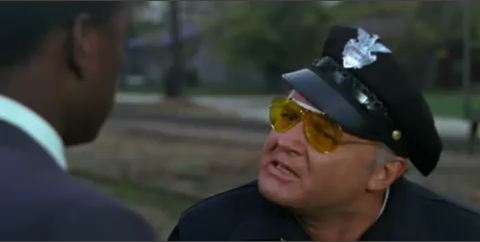
Throughout this film Poitier is the paragon of restraint, both in his words and in his movement. Here he's dead still, except for his eyes, but you can read so many emotions into it. I don't know if you could get away with this level of subtlety on an animated character; I suppose it would depend on how stylized the character is.
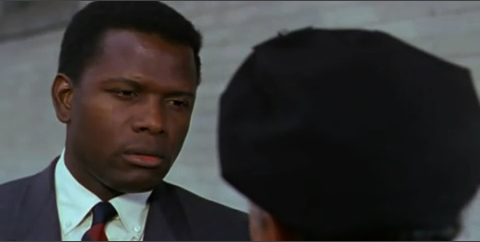
Finally, there's the wide shot. Steiger walks away, confident in his argument, and then stops and turns to allow us to focus completely on Poitier with him. Poitier pauses, as if he's still waiting for the train, then you see his resolve crumble, as he grudgingly realizes that he must stay. His stilted, boyish walk and the way he picks up the suitcase are so specific and entertaining to watch. Neither character will admit out-loud that they need each other, and their bodies communicate both resistance and acceptance. So juicy!
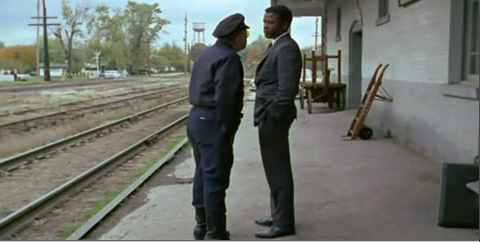
Scenes with this much depth, subtext and subtlety are rare in animated films, and I hope to see much more of them in the future. So often the writers feel like they have to have the characters say everything they are feeling; it's wonderful when the director can trust the animators to be actors and let them communicate non-verbally.
Dailies at Pixar

What is your favorite part...
...of the animation process? Find out my answer to this in my latest post on the Animation Tips & Tricks Blog. I'll give you a hint: it's not waiting for my shot to load. Feel free to mention your favorite part in the comments on the T&T site!
Wednesday, September 09, 2009
Rhythm and Texture
These are a couple of animation terms that get tossed around a lot, and many animators are not completely clear on exactly what they mean (I wasn't completely sure about them myself until well into my animation career). One reason I think they're so hard to pin down is that there's a lot of overlap (not that kind of overlap) between them, and it's hard to talk about one without referencing the other. Kind of like trying to talk about spacing without talking about timing and arcs. But lest I digress, I'm going to talk a bit about rhythm and texture as specifically as I can, and how important they are in your animation. I suppose I should attempt to define these terms before I go much further, so here's how I understand them:
Rhythm - how the actions or "beats" in a shot are spaced out over the length of a scene. You might also call this "tempo". Unlike with music, good animation has an inconsistent rhythm, making it less predictable.
Texture - the variations of timing and poses in your shot. Big and little actions, slow and fast timing, flurries of action and holds. A shot in which all the actions are the same size, have the same timing, and occur in an even rhythm has no texture.
Take a look at this clip from the classic Disney double-feature, "The Adventures of Ichabod and Mr. Toad". Here we see the hero, Ichabod Crane, wooing Katrina and evading fellow suitor, Brom.
There is plenty to be appreciated in this clip, but let's pay attention to the rhythm first. Notice how the first 4 pose changes on Ichabod are all timed about the same and are all spaced evenly in time - you can count out loud between the beats: "1-1000, 2-1000, 3-1000, 4-1000". In animation we generally try to avoid this kind of evenness in the timing; in music, a consistent rhythm is a good thing, but not in animation.* There's a method here, though: the animator is establishing a pattern so that he can break it. He gets the audience used to a certain rhythm so that when he changes it the audience is surprised. When Brom appears suddenly and tries to grab Ichabod the scene shifts into high speed. This contrast of rhythm creates emphasis - we know something important just happened. It's such a fast change that if it weren't staged perfectly, the audience would miss it and wouldn't understand the action. Notice how Brom hits his "grab" pose and holds it, and how Ichabod's hat floats in the air to tell you where his head "was", since there was no anticipation into his drop.
My favorite part of this scene is the next shot, where we cut inside the house and Ichabod is standing completely still, as if nothing just happened. The action of lifting his hat is tiny compared to all the big flourishes and the escape that proceeded the shot, and is isolated to just his arm. It's another big change in the rhythm and phrasing of the scene, and it not only reiterates Ichabod's composure in front of women, but also adds unexpected entertainment value. A few more quick actions (grabbing and presenting the flowers), and the sequence ends with Ichabod melting into a relaxed pose. All these changes in tempo, size of action and timing give the scene its texture.
The above clip is a pretty broad example, but you can achieve the same kind of texture in a smaller, simpler scene. Here's a clip from Monsters, Inc. featuring Sully, who is reacting to an offscreen sound.
Essentially, Sully is doing the same action over and over: he is looking around for the source of the sound. However, the animator has given the shot texture by varying the timing and size of the looks, as well as breaking up their distribution over the course of the shot to give it a more organic, staccato rhythm. Notice also that there is a progression in the looks; they start small, just in the eyes, then move on to progressively bigger and bigger moves involving the head and the torso. There's even a double-take to break up the tempo even more. The final look is the largest, and involves the biggest shape change in the body by incorporating the screen left arm. This gives the final look the most emphasis, because it's the point of the shot; this is when Sully will actually see the source of the sound (Boo playing with his tail).
Planning and blocking and animated scene is a complicated undertaking, and there are many things to keep in mind. It's not enough to obey the 12 animation principles. It's not enough to have original acting ideas and clear posing. You have to figure out the best combination of all these things to create your performance. Memorizing the dictionary and grammar rules does not make you a poet! You must find ways to string your ideas together lyrically to create a clear, cohesive, and of course, entertaining performance. You may come up with 4 great ideas for your shot, but the ideas might not flow together well. As important as your acting ideas are the changes between your ideas. What's more, the shot may only need 2 ideas. Try to be economical with your ideas, and find a sequence that flows together well. Figure out how little you need to do in the shot.
I usually start by just throwing out every idea I can on paper and/or video tape. Next I narrow it down to my favorite ideas that I think are most appropriate to the shot. From these I try to find the ideas that flow together naturally and create a nice progression, making sure that the biggest change occurs at the right time to emphasize the point of the shot. Once I have this phrasing worked out, I start to block my poses and actions into the computer. Now I can start to experiment with timing, playing with the speed of the individual actions and moving my beats around in time to try to break up the rhythm of the shot. The computer is great at helping you figure out your timing without wasting a lot of effort. This is how I find the texture in my animation. Usually after I've done my first blocking pass, I'll end up adding or removing an idea, or changing something from what I had planned to make it work better in the actual 3D scene. But no matter what I always play back the entire scene to make sure it has a pleasing texture. Always check the texture not only across the single shot that you're working on, but across the entire sequence. Remember to look at your work in context!
* What if you're animating to music? If a character is singing or dancing you want to respect the overall rhythm of the music, of course, making sure you regularly accent the beats of the music. But you must also look for places where you can add accents that fall outside the music's tempo. If you stay slavishly locked to the same beat, the animation will quickly become boring to watch. Have some accents fall on down beats, some on upbeats, some between beats. Have some actions happen in double-time, some in half-time. Remember that whenever you stray from the tempo of the music, you create emphasis, so do it wisely! Check out this vintage Flat Eric clip:
Note how he hits the down beat for most of the clip, but occasionally he breaks into a new rhythm, or skips a beat for emphasis (around 00:23). These little changes in the rhythm keep the clip entertaining to watch.
Thanks for reading!
Subscribe to:
Posts (Atom)